How linking works
This page explains how Linker keeps the field and the Jira links matching each other. Read it if you want to understand what happens after someone saves the field, links a work item by hand, or edits work items in bulk, and how fast each change shows up.
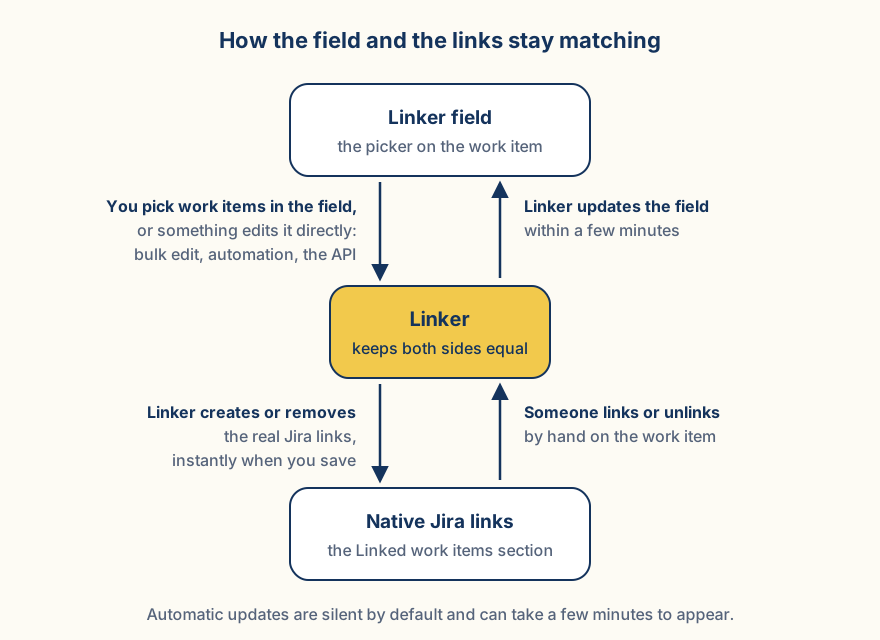
Linker keeps the field and the links aligned through three mechanisms working together, plus a repair pass that runs whenever somebody opens the work item:
1 · Instant path
When someone saves the field, Linker creates and removes the links immediately, with no waiting.
2 · Safety net
Some changes bypass the field, for example the create screen, bulk edits, Automation rules, CSV imports, or scripts. Linker notices these too and brings the links back in line. This can take a few minutes; see Limitations & timing.
3 · Reverse sync
When someone links or unlinks work items by hand, the field updates itself to match, also within a few minutes. These updates are silent by default: nobody gets a notification.
4 · The open page repairs itself
The safety net needs Jira's events, and those take their time. So the field does not sit and wait: every time it is displayed, it compares the work items it holds against the native links that actually exist on the work item. When it holds values and this field has never made a link here, it writes the missing links on the spot.
In practice this closes the gap in the two situations where people notice it most:
- After the create screen. Somebody picked related work while creating the item, so there was no work item yet to link from. Opening the new item makes the links appear at once instead of after the event delay.
- After a CSV import, a bulk edit, an Automation rule or a REST write. The values are in the field, the links are not there yet. Whoever opens the work item first gets them written.
The repair is deliberately narrow, so it can never be the thing that loses data or the thing that argues with you:
- It only adds. It works towards the value the field carries right now, so nothing counts as deselected and nothing is deleted.
- It stands down as soon as this field has created a link on this work item. This is the important one: delete such a link by hand in Jira's own Linked work items section, and opening the page does not put it back. Whether a hand-deleted link should return is a question for reverse sync and the configured delete behavior, not for a page load. So the repair covers exactly the situation it was built for: values that arrived without any links at all.
- It does nothing when the field is empty, when the context does not create links at all, in the customer portal, or when the app's licence is not active.
- It costs nothing when there is nothing to do: the value and the links are already in the same response that renders the field, so the check is a comparison, not an extra request.
Technical details
In a context with the single selection mode (One work item (new pick replaces)), the field holds at most one value. When several native links of the configured type exist on a work item, created by hand or through the API, sync and resync resolve them to the newest link; the resync confirmation for such a context says so.
The safety net and reverse sync listen to Jira events; delivery timing is set by Jira, up to ~3 minutes. The counterpart field (work item B's field) is governed by B's own context configuration and its reverse-sync toggle, with the same direction matching: a directed link type still only appears on the side it matches. App-created links are tracked on both sides, which is why deselecting works from either work item. Counterpart fields fill immediately when linking through the field, and with the safety-net delay when the change came through the API or automation.
Link events update the field incrementally rather than replacing it: keys are added when their links appear, and on a delete event only the deleted link's partner key may be dropped (full alignment stays the job of reconcile and resync, which do not race with in-flight edits). When the configured link type cannot be resolved, every derived value would come out empty, so the sync switches to add-only until the type resolves again.
The repair on display runs through the same reconcile routine as the instant path, with the field's current values as the target, so it creates links, records them as app-made and aligns the counterpart fields, and it can never remove anything. It is gated on this field owning no link at all on that work item, which is what keeps it from resurrecting a link somebody deleted by hand. It runs on the first render and on the view's own refreshes, so a work item left open picks up a change made elsewhere without a reload of the browser page. The opposite direction is covered too: when the field view notices that a native link it was showing has disappeared, it asks the server to derive the field from the links again, instead of waiting for the event.
How fast is it?
Saving the field is instant, and so is the repair that runs when somebody opens a work item whose links are missing. Everything driven by Jira's events can take a few minutes; the full timing picture is on Limitations & timing.